Kanboard
Open-source kanban project management software for self-hosted teams. Kanboard combines drag-and-drop boards, workflow automation, plugin hooks, and a JSON-RPC API in a minimalist PHP application.
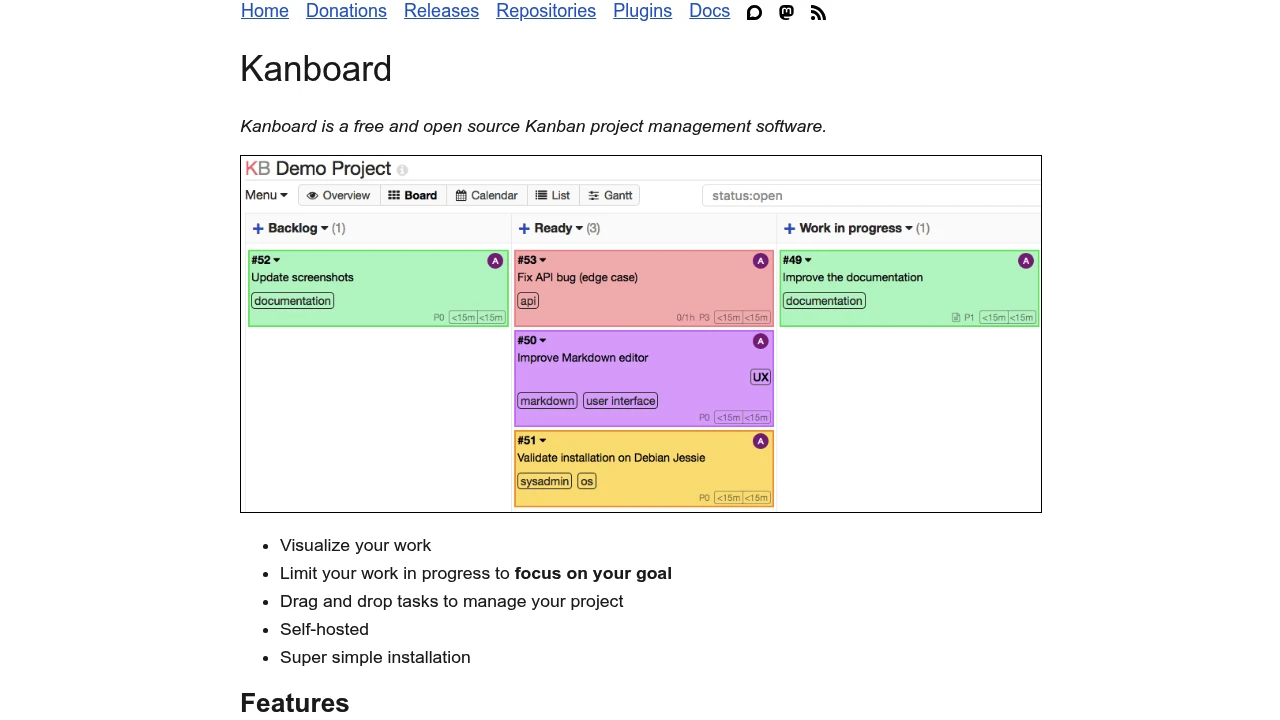
Kanboard is a self-hosted kanban project management application built for teams that want a simple board-centric workflow without the overhead of a larger work management suite. It combines configurable columns, work-in-progress limits, automatic actions, plugin hooks, and a JSON-RPC API for integrating external systems.
What it does
Kanboard lets teams organize work on drag-and-drop boards with columns, swimlanes, due dates, categories, comments, attachments, subtasks, and time estimates. Its query language helps filter tasks by assignee, metadata, deadlines, and other fields, while automatic actions can move cards, change assignees, recolor tasks, or trigger follow-up workflow steps when events happen.
The platform is designed for self-hosted deployment and can run with SQLite, PostgreSQL, or MariaDB. It supports Docker images, plugin installation, LDAP or Active Directory integration, and OAuth2 authentication providers such as GitHub, GitLab, and Google. For external integrations, Kanboard exposes both application-level and user-level JSON-RPC APIs over HTTP POST, including batch requests.
Deployment and extensibility
Kanboard fits small teams, internal IT groups, engineering teams, and operations teams that want a lightweight board without paying per-seat SaaS fees. The plugin system extends notifications, authentication, metadata, external task providers, routes, and event handling, which makes the core product more adaptable than its deliberately minimal interface first suggests.
Official container images are published through Docker Hub, GitHub Container Registry, and Quay. The project also documents health checks for container orchestration, version-pinned Docker tags, and example Compose setups with PostgreSQL, MariaDB, or SQLite backends. That makes Kanboard practical for low-cost internal deployments where administrators want straightforward hosting and data ownership.
Limitations
- The project is in maintenance mode, so major new features are unlikely and roadmap momentum is lower than more actively expanding competitors.
- The official interface is intentionally minimal, which keeps the tool approachable but leaves out broader portfolio planning, reporting, and enterprise collaboration features found in larger project suites.
- API access is based on JSON-RPC rather than the more common REST patterns many SaaS integrations expect, so teams may need custom connectors or middleware.
- The plugin ecosystem adds flexibility, but some extensions depend on community maintenance and may vary in compatibility across Kanboard releases.
- Mobile access is usually handled through the web UI or third-party clients instead of a first-party native mobile application.
KanboardKanboard and Focalboard are both open-source board-oriented project tools for self-hosted teams, but Kanboard emphasizes a minimalist maintenance-mode PHP stack while Focalboard is positioned as a more modern Trello-style collaboration experience.
Kanboard Redmine
Kanboard and Redmine both serve self-hosted project tracking, but Kanboard centers on a simple kanban board while Redmine is a broader project and issue management application with wikis, Gantt charts, and deeper administrative features.
KanboardKanboard and Taiga are both self-hosted open-source project management tools with kanban boards, but Kanboard stays intentionally minimal while Taiga expands into broader agile planning with Scrum features and richer team collaboration.
Similar to Kanboard